

Description
Download Firefox Mass Extensions Manager – free Windows extension manager tool
Firefox Mass Extensions Manager is a lightweight, free utility created by Andrey Kvasnevskiy specifically for Windows users who rely on the Firefox browser. In today’s fast‑paced digital environment, browsers are often loaded with dozens of add‑ons that boost productivity, block ads, or enhance security. While these extensions add value, they can also become a source of clutter, slow performance, or even conflicts. This software steps in as a dedicated manager, allowing you to enable, disable, or uninstall multiple extensions in bulk, rather than handling each one individually. The tool’s intuitive interface, secure operation, and regular updates make it a reliable companion for power users, developers, and casual surfers alike. By consolidating extension control into a single, easy‑to‑navigate window, Firefox Mass Extensions Manager helps you keep your browser lean, fast, and tailored to your exact needs.
Key Features that Simplify Extension Management
- Bulk Enable/Disable: Toggle dozens of extensions with a single click, saving time when testing or troubleshooting.
- One‑Click Removal: Uninstall selected extensions in bulk, removing both the add‑on and its residual files.
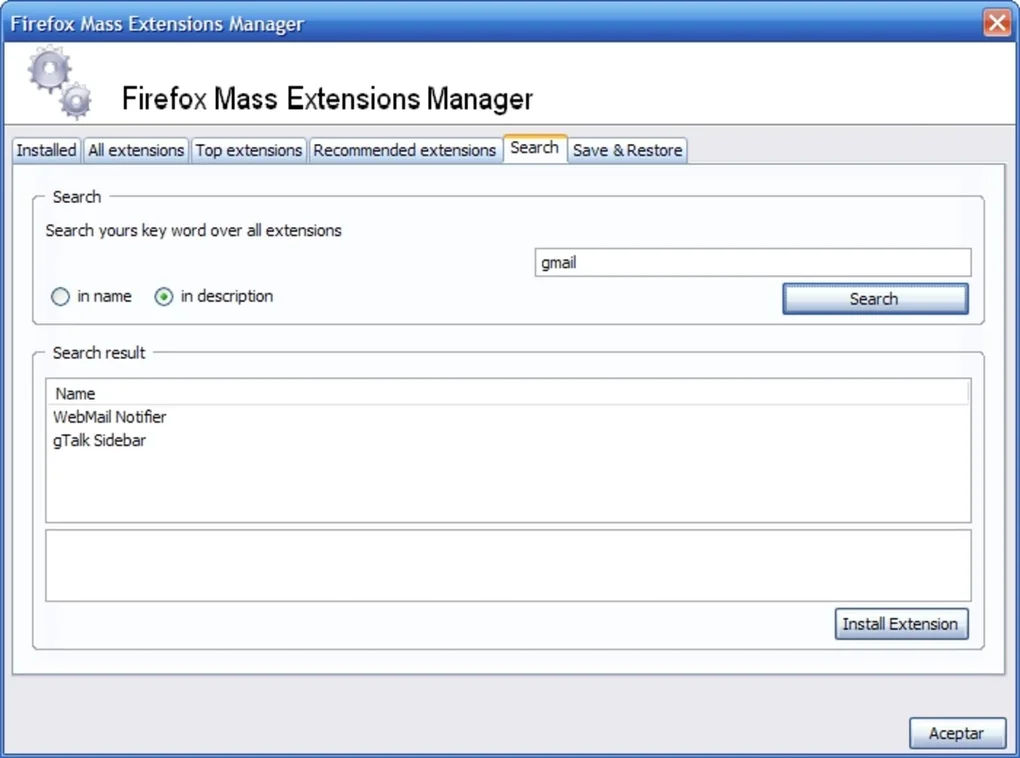
- Search & Filter: Quickly locate extensions by name, status, or category using a responsive search bar.
- Export/Import Settings: Save your current extension configuration to a file and reload it on another machine.
- Real‑Time Sync with Firefox: Changes are reflected instantly in the browser without needing a restart.
- Lightweight Design: Consumes minimal system resources, ensuring that the manager itself does not slow down your PC.
- Secure Operation: Operates with read‑only permissions for Firefox’s profile folder, eliminating the risk of corrupting core files.
- Automatic Updates: Built‑in updater checks for newer versions and installs them securely.
- Customizable UI Themes: Choose between light, dark, or system‑matched themes for comfortable daily use.
- Detailed Extension Info: View version numbers, permissions, and update dates for each add‑on.
Step‑by‑Step Installation and Everyday Usage
Getting started with Firefox Mass Extensions Manager is straightforward. First, visit the official download page and click the Download for Windows button. The installer is a compact .exe file, typically under 5 MB, and is signed with a valid certificate to assure a secure download. After the download completes, double‑click the installer and follow the on‑screen prompts: accept the license agreement, choose an installation folder (the default location works for most users), and let Windows create a shortcut on your desktop.
Once installed, launch the application. It will automatically detect the default Firefox profile on your system. If you use multiple profiles, a drop‑down menu lets you switch between them. The main window displays a list of all installed extensions, each with a checkbox, status indicator, and brief description. To enable a group of extensions, tick the checkboxes next to the desired add‑ons and click the Enable Selected button at the top. Disabling works the same way with the Disable Selected button. For removal, select the extensions and press Remove Selected; a confirmation dialog ensures you don’t delete anything unintentionally.
Advanced users can export their current setup by clicking Export Configuration, which generates a .json file. This file can later be imported on a different machine or after a fresh Firefox installation, instantly restoring your preferred extension layout. The built‑in search bar filters the list in real time, making it easy to locate a specific extension among dozens. Finally, the Check for Updates button contacts the developer’s server to fetch the latest version, ensuring you always have the newest features and security patches.
Compatibility, Performance, and Balanced Evaluation
System Compatibility
Firefox Mass Extensions Manager is designed exclusively for Windows platforms, supporting versions from Windows 7 up to Windows 11. The application runs on both 32‑bit and 64‑bit architectures, detecting the appropriate Firefox installation path automatically. While the tool is not officially available for macOS, Linux, Android, or iOS, power users on those platforms can manage extensions directly through Firefox’s built‑in add‑on manager. For Windows users, the program integrates seamlessly with the default Firefox installation located in C:\Program Files\Mozilla Firefox or the user’s AppData directory.
Pros
- Completely free with no hidden fees or advertisements.
- Bulk operations dramatically reduce time spent on extension management.
- Lightweight and fast; does not interfere with Firefox performance.
- Secure handling of Firefox profiles prevents accidental data loss.
- Regular automatic updates keep the tool current and safe.
Cons
- Limited to Windows; no native support for macOS, Linux, Android, or iOS.
- Lacks advanced scripting or API integration for developers.
- Interface, while functional, may feel basic compared to commercial suite tools.
Frequently Asked Questions
Is Firefox Mass Extensions Manager safe to use?
Yes. The application operates with read‑only access to your Firefox profile and never modifies core browser files. It is digitally signed and regularly updated to address any security concerns.
Can I manage extensions for multiple Firefox profiles?
Absolutely. Upon launch, the manager detects all existing profiles and lets you switch between them using a drop‑down menu, allowing separate bulk actions for each profile.
Do I need an internet connection to use the tool?
An internet connection is only required for downloading the installer, checking for updates, or exporting/importing configuration files from a remote location. All core functions work offline.
Will the manager remove extensions from the Firefox Add‑Ons website?
No. It only removes the add‑on from your local Firefox profile. The extension remains listed on the Mozilla Add‑Ons site, allowing you to reinstall it later if desired.
How do I report a bug or request a new feature?
You can submit issues directly on the developer’s GitHub repository or via the “Contact Support” link within the application. The developer actively monitors feedback and often releases patches based on community input.
Conclusion – Streamline Your Firefox Experience Today
For Windows users who rely heavily on Firefox extensions, the Firefox Mass Extensions Manager offers a focused, free, and secure way to keep your browser organized. By eliminating the need to toggle each add‑on individually, you save valuable time and reduce the risk of performance bottlenecks caused by conflicting extensions. Its lightweight footprint, automatic update mechanism, and intuitive UI make it a practical addition to any power‑user’s toolkit. While it lacks cross‑platform support, the tool excels in its niche, delivering precisely what it promises: fast, bulk management of Firefox extensions.
Ready to declutter your browsing environment? Download Firefox Mass Extensions Manager now, enjoy a smoother, faster Firefox experience, and take full control of your extensions with just a few clicks.
Guides & Tutorials for Firefox Mass Extensions Manager
How to install Firefox Mass Extensions Manager
- Click the Preview / Download button above.
- Once redirected, accept the terms and click Install.
- Wait for the Firefox Mass Extensions Manager download to finish on your device.
How to use Firefox Mass Extensions Manager
This software is primarily used for its core features described above. Open the app after installation to explore its capabilities.
User Reviews for Firefox Mass Extensions Manager 0
No reviews found





